User Access Tool (UAT)
The User Access Tool (UAT) is a mature Identity and Access Management (IAM) platform that has been in production since 2004 and has been globally deployed since 2015. UAT supports user provisioning, privilege management, and reconciliation processes across multiple platforms and device types.
Event-driven automation execution is now enabled by integrating User Access Tool (UAT) with Bridge Automation Services (BAS), allowing IAM events generated by UAT to automatically trigger automation workflows while preserving existing UAT processes and deployments.
This integration provides:
- Automated execution of IAM-related workflows
- Event-driven provisioning and reconciliation processes
- Standardized processing through DSS and BAS
- Improved operational efficiency
- Consistent execution and tracking of IAM activities
- Reuse of existing UAT workflows without major architectural changes
Supported contents
The following UAT-related contents are available through Bridge Automation Services (BAS):
1. UAT provisioning - GEMU
Performs user ID and privilege provisioning activities initiated from UAT events.
Repository: UAT Provisioning Repository.
2. UID generic single extractor - GEMU
Supports reconciliation and extraction of user ID information based on a single request.
Repository: UID Generic Single Extractor Repository.
3. UID Mass extractor - GEMU
Supports mass extraction of user ID information.
Repository: UID Mass Extractor Repository.
During feature validation discussions, the team confirmed that the UID Mass Extractor does not use the event-driven flow and therefore follows a different execution model than the Provisioning and Generic Single Extractor contents.
End-to-End flow
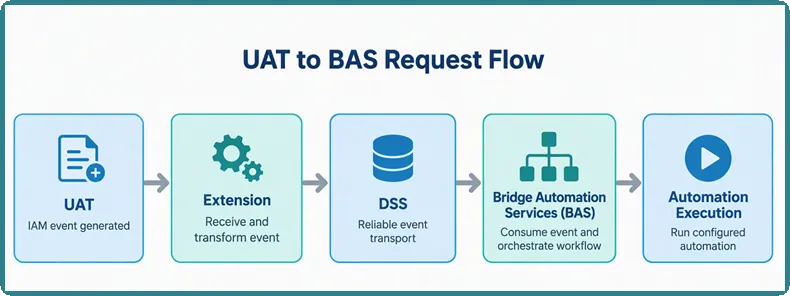
The following diagram shows the UAT to BAS request flow.
Detailed steps
- A user action or IAM process occurs in UAT.
- UAT generates an event.
- The event is sent to the Extension.
- The Extension processes the payload and forwards it to DSS.
- DSS publishes the message.
- BAS consumes the event message.
- BAS executes the configured automation.
- Execution status is generated.
Response flow
After processing is completed, the execution status follows the reverse path:
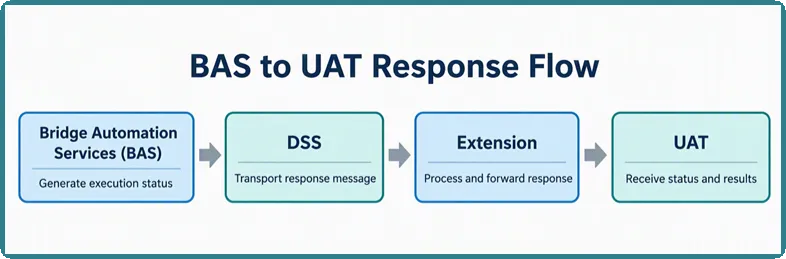
The response contains execution status and result information, allowing UAT to track the lifecycle of the request.
Message tracking
For tracking and correlation purposes, the following fields are propagated through the flow:
- Run ID
- Workflow ID
- Message Key
- Message Type
- Message Class
- Execution ID
These identifiers enable end-to-end traceability between:
- UAT
- Extension
- DSS
- BAS
Catalog configuration
Each UAT content is represented in Bridge Automation Services (BAS) as a Catalog Item.
When creating or activating a Catalog Item:
- Configure the automation repository.
- Define required parameters.
- Configure default values.
- Map event payload fields to automation inputs.
- Activate the Catalog Item.
Prerequisites
Before enabling UAT event-driven integrations, ensure:
- UAT environment is operational
- Extension is configured
- DSS connectivity is available
- BAS tenant is provisioned
- Required Catalog Items are activated
- Event Rules are configured
- Automation repositories are accessible
Troubleshooting
Event not triggering automation
Verify:
- Event Rule is enabled
- Payload matches rule criteria
- DSS message was delivered
- Account is provisioned for DSS integration
Common error: AIOPS_ACCOUNT_NOT_PROVISIONED
This occurs when the target account is not provisioned for DSS/event integrations.
Event received but no execution created
Verify:
- Event mapping configuration
- Payload structure
- Message type
- Message class
- Message key values
Automation execution fails
Verify:
- Catalog Item configuration
- Repository accessibility
- Credentials
- AWX/Tower connectivity
- Input parameter mappings