Netowork Monitoring Extension Enablement(Zabbix)
Managed Network Services requirement
As a DP and Service Delivery analyst I want to view Network Performance Monitoring Dashboards in Bridge AIOps, so that I can understand the health of my customer's network.
As a customer, I want to view Network Performance Monitoring Dashboards in Bridge, so that I can understand the health of my network.
Solution: Develop and deploy shared extension to pull network devices metrics from source Zabbix instance for multiple customers.
Assumptions
- Zabbix host tags are defined
- Zabbix item keys used are a defined for lab devices
ADO Feature | Description | Status |
|---|---|---|
2476651 | Develop Shared Zabbix Instance Extension for Performance Monitoring Dashboards | Development Complete & prod deployment process in progress |
Architecture
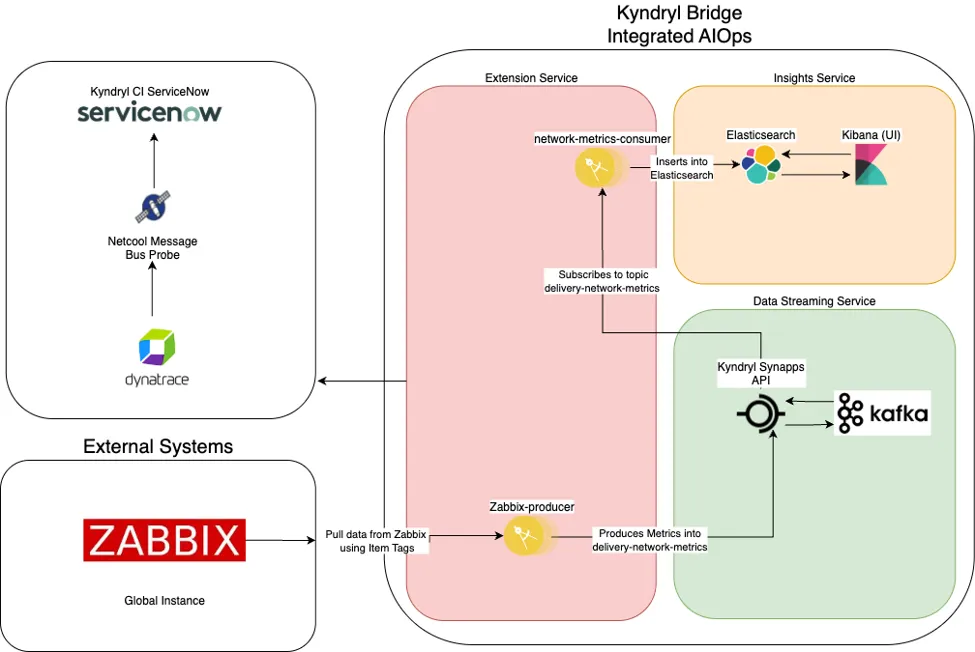
Tests performed
- Onboarded devices on NPM dashboard
- Devices with multiple gsma_code are pulled from Zabbix
- Pull network devices based on tag definition 'class:network'
- Extension check for Zabbix instance availability & gsma_code
- Extension polling and payload from log.
Support
- Existing L1/L2/L3 support model
Appendix
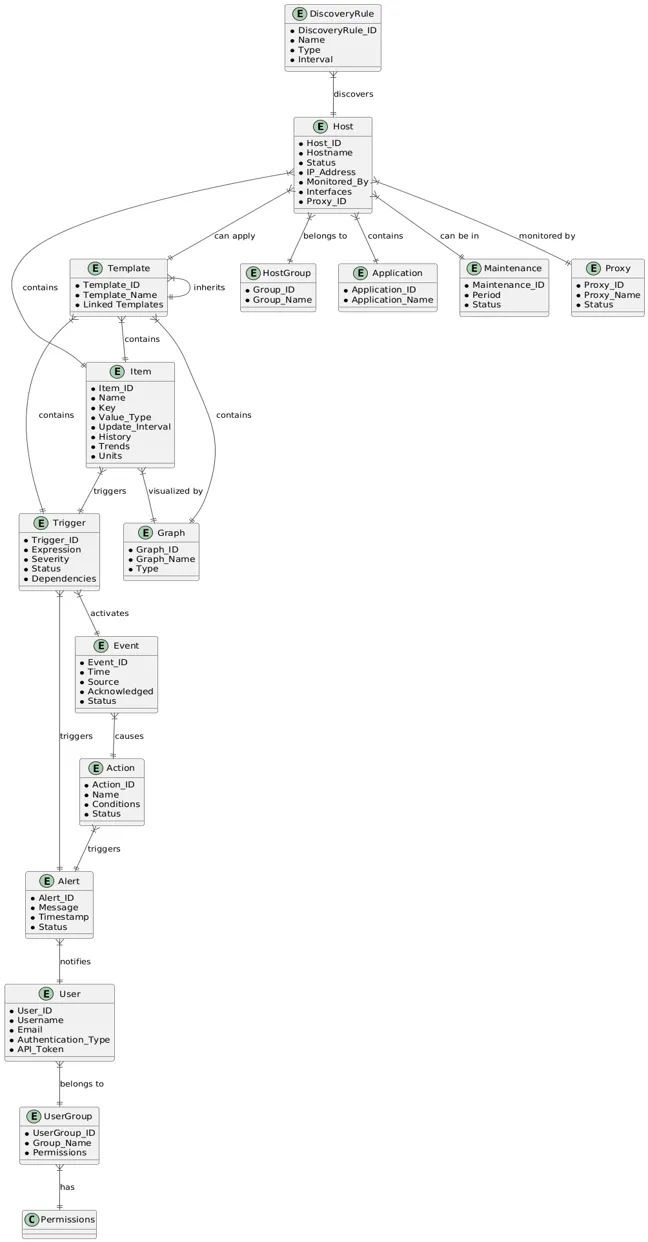
O&A naming conventions
Create Hosts Groups
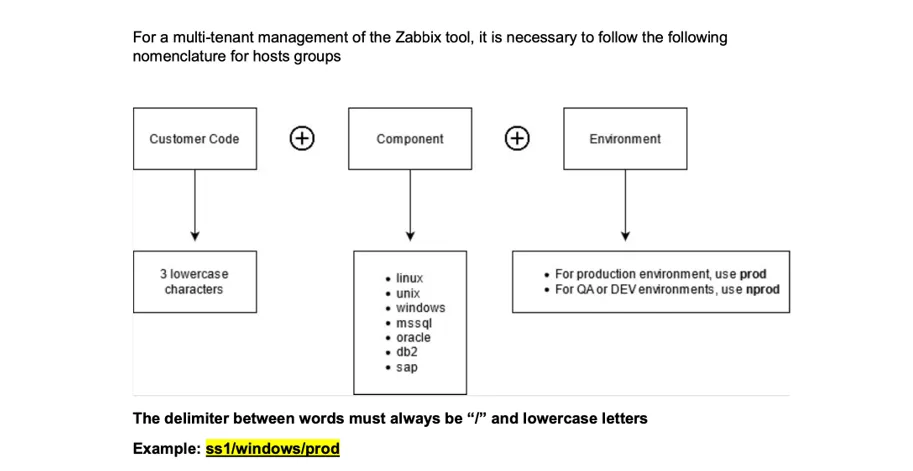
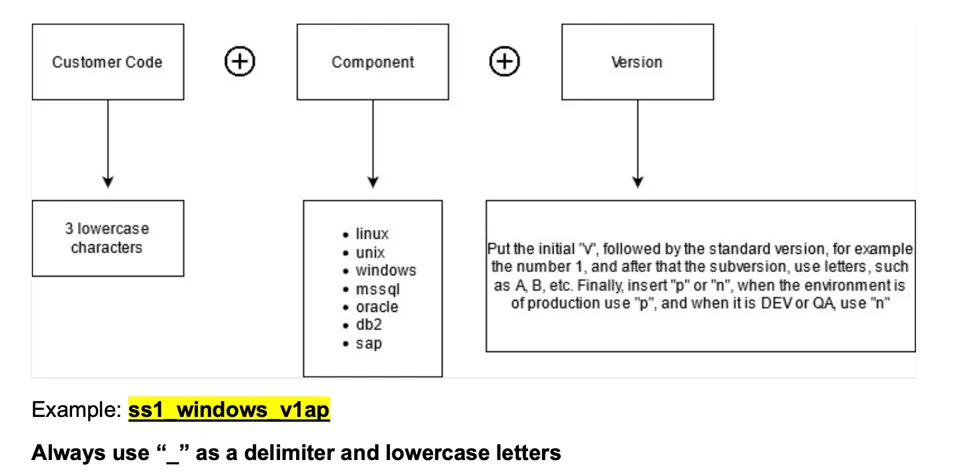
Naming convention
The naming convention is mostly optional, but recommended naming conventions are as follows:
Host naming
The Name must be unique in the Zabbix Instance, therefore there can be conflict between different accounts. It is recommended to add prefix with customer code.
The recommended naming for Hosts is: {Customer code}.{Short hostname}
Example: m12.eu1d63lpm1eslap1
A single agent can have multiple Host Names, this can be used to identify monitoring for susbsystems and instances. Then follow naming as: {Customer code}.{Short hostname}.{Subsystem name}.{Subsystem instance}
Examples: m12.eu1d63lpm1eslap1.mysql.production
Proxies and proxy groups
The name of the proxy and especially proxy group should allow the Account Admin to clearly identify which proxy group (or proxy) should be used for which devices. It should usually contain: Customer Code and specific scope in form of location or type of devices, for which is the proxy group dedicated.
Recommended: {Customer code}-proxy-{Scope} Considering that many admins may manage multiple accounts in single environment (optionally adding a number as {ID}, as result {Customer code}-proxy-{ID}-{Scope}).
Host groups
The host groups are used to assign access to user groups.
The Zabbix organize groups and subgroups as “nested” groups:
- For example, the group named “/Europe/Belgium” is a subgroup of group named “/Europe”.
This is usually used to grant access to group and all its subgroups.
The account hosts will be assigned to a group with following naming standard
Accounts/{Customer code}
Where
- **CustomerCode** - Customer tricode
The following additional separation is optional:
Accounts/{Customer code}/{Type}/{Group}/{Environmnet}
Where
- **Type** - Type of Server belong to ('os', 'db', 'middleware', 'app', 'service', 'web', etc...)
- **Group** - Group of types ('linux', 'windows', 'mysql', 'mssql', 'was', etc...)
- **Environment** - Depend of customer (usual 'prod', 'dev', 'preprod', etc...)
Examples:
Accounts/hmc/os/linux/prod
Customers/ib1/os/aix/dev
Template Groups
Template group for accounts should follow below naming standard (schema):
Templates/{Customer code} -or- Templates.{Customer code}/ depending on your agreement with O&AaaS.
The following additional separation is optional:
Templates/{Customer code}/{Type}/{Group}
Templates.{Customer code}/{Type}/{Group}
Examples:
Templates/tbe/os/linux
Templates/tbe/os/linux/modules
Templates.tbe/os/aix