DSRR Audit Trail
The Audit Trail tab on the DevSecOps and Software Readiness Review (DSRR) Candidacy Orchestration page provides Release Managers with a chronological record of approval and rejection decisions made in DevOps Intelligence. Each audit entry includes the affected work item, decision, application, decision date and time and the Release Manager's email address.
The Audit Trail is updated after synchronization and supports filtering to help users quickly locate specific work items. The Audit Trail only records approval and rejection actions completed in DevOps Intelligence. Actions performed directly in Azure DevOps (ADO) are not included.
Access the Audit Trail
Follow these steps to access the Audit Trail tab and review approval and rejection decisions for DSRR candidacy work items.
- From the Kyndryl Bridge main menu
 , go to Services → Platform Services → Toolchain & Pipeline → DevOps Intelligence.
- From the left navigation menu, navigate to DevSecOps & Software Readiness Review.
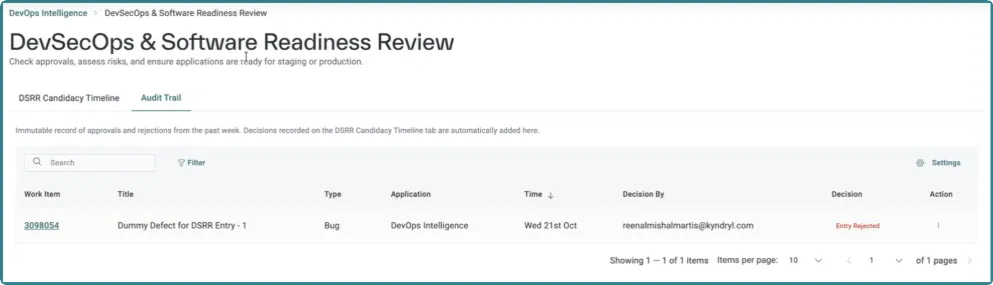
- On the DevSecOps & Software Readiness Review page, select Audit Trail tab to view decisions recorded through DevOps Intelligence.
Audit Trail tab
The Audit Trail tab includes the following columns:
- Work Item: Displays the unique identifier of the work item associated with the DSRR decision.
- Title: Displays the name or summary of the work item.
- Type: Indicates the work item type, such as a bug or user story.
- Application: Identifies the application associated with the work item.
- Time: Shows the date and time when the approval or rejection decision was recorded.
- Decision By: Displays the email address of the Release Manager who made the decision.
- Decision: Shows the outcome of the review, such as Entry Approved or Entry Rejected.
- Action: Provides access to additional actions available for the audit record.
Approval and rejection of Audit records
The Audit Trail records approval and rejection decisions performed by Release Managers through DevOps Intelligence. When a Release Manager approves or rejects a work item, the action is logged and becomes available in the Audit Trail after synchronization.
The Audit Trail record helps users identify:
- Which work item was approved or rejected.
- The decision that was made and when it was made.
- Which Release Manager made the decision.
- The application associated with the work item.
Only decisions completed through DevOps Intelligence are recorded in the Audit Trail. Approval or rejection actions performed directly in Azure DevOps (ADO) are not displayed in the Audit Trail.