Commvault Cyber Recovery
Overview
This guide describes the integration of Intelligent Recovery Service with Commvault for cyber recovery of protected VMware virtual machines. The solution orchestrates the Commvault technology for low touch discovery, workflow driven restore, report native threat scanning, recovery precheck & validation and reporting capabilities.
Kyndryl Bridge provides the user-facing experience, while Intelligent Recovery Service coordinates recovery workflows across the production, vault, clean room, and isolated recovery or production recovery zones. The solution is intended to improve recovery readiness, operational visibility, and traceability during cyber incidents such as ransomware attacks.
How to use this guide
Use this guide to:
- Use the architecture, prerequisite and privileges sections during solution planning.
- Use the setup and automation sections during onboarding and recovery workflow configuration.
- Use the error-code reference during operational diagnosis.
Solution capabilities
The objective is to onboard the Commvault Cyber Recovery solution to Intelligent Recovery Service and enable secure, automated recovery of cyber-protected VMware workloads.
- Identify workloads protected through immutable storage or Air Gap Protect.
- Restore workloads from secure backup copies.
- Report threat scanning and integrity validation in an isolated clean room.
- Orchestrate the scaled restore of workloads based on point in time copies to an Isolated Recovery Environment (IRE) or production recovery environment.
- Monitor cyber recovery posture, readiness, backup health and protection status.
- Provide audit-ready logs and operational diagnostics for cyber recovery actions.
Architecture and network flow
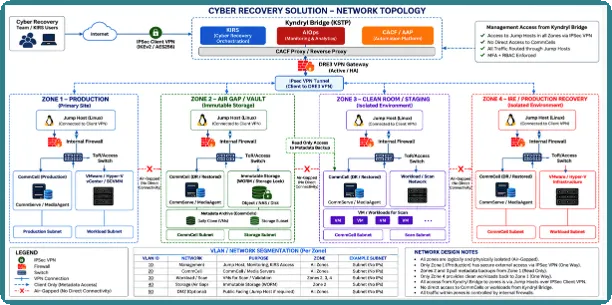
Architecture overview
Intelligent Recovery Service Bridge, and CACF are hosted at the KSTP Kyndryl site. The customer establishes a dedicated VPN tunnel to permit secure automation access to the customer environment. Each recovery zone uses a dedicated jump host as the controlled management entry point.
Zone | Purpose | Key interactions |
|---|---|---|
Zone 1: Production | Hosts protected workloads and primary Commvault and VMware services. | Backup, discovery, policy actions, inventory, and replication to the vault. |
Zone 2: Air Gap / Vault | Stores isolated, immutable recovery copies. | Receives backup copies and supplies recovery data for restore or live mount. |
Zone 3: Clean Room / Staging | Provides an isolated area for recovery validation. | Restores or mounts workloads, perform threat scanning and validates integrity. |
Zone 4: IRE / Production Recovery | Hosts validated recovered workloads. | Receives approved workloads, performs final recovery and emits status and audit telemetry. |
Key components
Component | Role |
|---|---|
Intelligent Recovery Service | Central control points for discovery, cyber recovery configuration, orchestration, scan, validation and promotion of workflows. |
Kyndryl Bridge | User interface for workload and zone configuration, workflow initiation, insights, alerts and compliance visibility. |
Commvault CommCell / Command Center | Manages backup, replication, immutable or Air Gap Protect storage, recovery points, restores and job status. |
VMware vCenter | Manages VM provisioning, power operations, network mapping, and VM lifecycle activities across zones. |
AWX / automation services | Executes playbooks, manages credentials and runs orchestration tasks through jump hosts. |
Security controls / NSX-T | Enables or disables air-gap network rules when configured for the solution. |
DevOps / SRE teams | Maintain automation of playbooks, workflows, and integration of artefacts. |
Network flow and ports
Flow | Source to destination | Purpose | Ports stated in source |
|---|---|---|---|
Control plane | Intelligent Recovery Service / AIOps / CACF to each zone jump host | Trigger discovery, policy, restore, scan, validation and promotion actions. | HTTPS 443; Commvault 8400-8403 |
Zone 1 internal | Commvault services to protected workloads and vCenter | Backup metadata, snapshot orchestration, and inventory. | vCenter API 443; VMware data path 902 |
Replication | Zone 1 Commvault to Zone 2 Commvault / immutable storage | Replicate backup copies to the secure vault. | Commvault 8400-8403; HTTPS 443 |
Cross-vCenter migration | Source ESXi to destination ESXi | Migrate validated VMs to production. | TCP 8000 (vMotion); TCP 902 (NFC) |
Telemetry | Zone 4 jobs to Intelligent Recovery Service dashboards and reports | Publish readiness, status and audit signals. | Not specified |
The source distinguishes control-plane traffic from data-plane traffic. Backup copy, restore, scan and promotion data movement occurs between recovery zones, while orchestration uses the zone jump hosts.
Risks, Assumptions, Constraints and Dependencies (RACD)
Risks
- Loss of jump host or VPN availability can interrupt automation workflows.
- Incorrect zone isolation or air-gap configuration can prevent workflow execution or weaken recovery separation.
- Insufficient datastore capacity, ESXi memory, missing port groups, or unhealthy hosts can block recovery.
- A compromised or failed threat scan must prevent a workload from being promoted.
- Manual reprotection is required after promotion because VM UUID and Commvault client ID can change.
Assumption
- Commvault protection is configured for the production of VMware workloads.
- Immutable storage or Air Gap Protect copies and valid snapshots are available for cyber recovery.
- Required zones, profiles, credentials, jump hosts, and recovery infrastructure are prepared.
- Commvault and vCenter APIs are reachable from the relevant jump hosts.
- Commvault Storage Lock is enabled on the disk library where the auxiliary storage copy is replicating data.
Constraints
- Insights are supported only when threat scanning runs from production.
- If live sync is not used, the CommServe database must be backed up in production and restored manually in the Clean Room or IRE.
- Promotion to production requires connectivity between source and destination ESXi hosts on TCP 8000 and TCP 902.
Dependencies
- Intelligent Recovery Service, Kyndryl Bridge AIOps, CACF and AWX automation services.
- Commvault CommCell / Command Center, VMware vCenter and recovery infrastructure.
- Dedicated VPN connectivity and zone-specific jump hosts.
- NSX-T or customer-specific air-gap automation where Airgap opening and closing is required.
- Python aiohttp module and, where needed, pbrun on jump hosts.
Jump host
A dedicated jump host must be configured in the customer environment for controlled access to Commvault CommCell servers and VMware infrastructure. The architecture uses a separate management entry point for each zone. High availability of the jump host and VPN connectivity is mandatory for uninterrupted automation execution.
Jump host software requirements
- Install the aiohttp Python module. The VMware REST module vmware.vmware_rest.vcenter_vm_info uses it to connect to vCenter and retrieve VM power status.
- Install pbrun when a non-root jump host user cannot access Python modules installed by root.
- If modules are accessible to the login user, set enable_pbrun_jumphosts to disable in the jumphost inventory.
Supported versions
Component | Tested version |
|---|---|
CommServe | 11.42 |
VMware vCenter | 7 and 8 |
Minimum privileges
- vCenter administrative privileges are required for vCenter operations, including port-group reconfiguration.
- Commvault administrative privileges are required for backup and restore tasks.
- Role-based access and approval of workflows should restrict sensitive recovery actions to authorized personnel.
Features and benefits of the solution
Feature | Description | Business or operational benefit |
|---|---|---|
Cyber-protected VM discovery | Discovers VMs protected using immutable storage or Air Gap Protect and retrieves recovery metadata. | Identifies workloads eligible for secure recovery. |
Secure restore | Restores workloads from immutable or air-gapped copies to a Clean Room or IRE. | Reduces reliance on manual recovery activities. |
Threat scan and validation | Scans and validates restored workloads before promotion. | Helps prevent infected workloads from entering the recovery environment. |
Multi-zone orchestration | Coordinates Vault, Clean Room, IRE and production recovery stages. | Provides controlled progression through recovery gates. |
Bulk recovery | Supports recovery of grouped VMs based on application grouping and priority. | Enables coordinated recovery at application scale. |
Cyber recovery drill | Supports restore, scan, validation, cleanup, pre-check and post-check activities. | Improves readiness without disrupting production. |
Unified monitoring | Shows recovery readiness, backup integrity, immutable / air-gap status, scan results, and alerts. | Provides central operational visibility. |
Audit and RBAC | Records recovery actions and controls access to sensitive operations. | Supports traceability and compliance. |
Supported alerts, conditions and descriptions
KIRS provides common resiliency alerts that can be used to monitor cyber recovery readiness. The exact metric, threshold, and condition are defined by the deployed blueprint and insight configuration. The following alerts are most relevant to this solution.
Alert | Type | Impact | User interpretation |
|---|---|---|---|
RPO-Deviated | resiliency.rpo | Medium | The calculated RPO has moved outside the configured threshold. |
Datacopy-Impacted | resiliency.datacopy | Medium | The protected data-copy or replication state is impacted. |
Recovery-Prechecks-Failed | resiliency.recovery | High | One or more recovery readiness checks did not pass. |
Recovery-Impacted | resiliency.recovery | High | A recovery workflow is impacted and requires investigation. |
Airgap-disabled | resiliency.airgap | Medium | The configured air gap is disabled. |
Airgap-disabled-longtime | resiliency.airgap | High | The air gap has remained disabled beyond its configured operating condition. |
storage-non-immutable | resiliency.storage.immutable | Medium | The evaluated storage is not reported as immutable. |
Data-not-in-immutable | resiliency.data.in.immutable | Medium | The evaluated recovery data is not reported as residing in immutable storage. |
Anomaly-Detected | resiliency.anomaly | High | An anomaly has been detected in the monitored cyber recovery context. |
Backup-Failed | resiliency.backup | High | A monitored backup operation has failed. |
User action: Review the affected workload, confirm the related Commvault job or Intelligent Recovery Service automation status, validate the relevant protection or recovery prerequisite, and use the automation artefacts and error-code section for diagnosis.
Automation flows and tasks
Discover cyber-protected VMs
- Get Commvault credentials.
- Generate a Commvault token.
- Fetch cyber plans.
- Fetch cyber-protected VMs.
- Build output with the cyber_copies list.
Restore
- Validate snapshot and destination recovery infrastructure.
- Check ESXi health, datastore accessibility and capacity, resource pool and memory.
- Verify storage policy and cyber copy.
- Trigger the restore API and return the job ID.
Instant Mount VM
- Validate the live-mount target and destination host or cluster.
- Derive the VM name and check for an active mount or running job.
- Trigger a new mount when required and poll until completion.
Clean up Instant Mount
- Validate the live-mount target and policy.
- Identify the mounted VM GUID.
- Delete the mount from Commvault and vCenter when found.
Group pre-check
- Validate snapshots, datastore capacity, ESXi memory, port groups, host health and resource pools for multiple VMs.
Group post-check
- Confirm that the VM exists in DR vCenter.
- Validate disk count, disk properties, MAC addresses, and port-group assignments.
Enable / disable network air gap
- Validate NSX-T credentials.
- Apply the configured firewall-rule action through the air-gap automation.
Migrate to production pre-check
- Validate target ESXi health and accessibility.
- Validate datastore capacity, cluster membership, datacenter and required port groups.
Migrate to production
- Retrieve production vCenter credentials.
- Validate source VM and production infrastructure.
- Power off the cyber VM.
- Perform cross-vCenter clone and reconfigure production networks.
- Power on and run post-migration validation.
Migrate to production post-check
- Validate MAC addresses, port groups, disk count, disk size, power state, and preserved configuration.
Known limitations
- If live sync is not used, customers must manually back up the CommServe database from production and restore it in the Clean Room or IRE.
- After promotion to production, VMs must be protected again manually in Commvault, and discovery must be rerun in KIRS because VM UUID and client ID can change.
- Insights are currently supported only when threat scanning runs from production.
Prerequisites
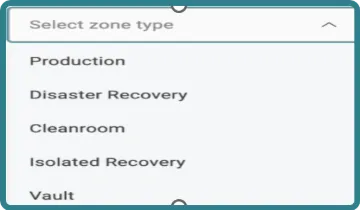
- Create the required zone types: Production, Disaster Recovery, Cleanroom, Isolated Recovery, and Vault.
- Create a recovery profile and attach it to the applicable zone. Supported profiles include Cleanroom, Isolated Recovery-Test-Environment, Migrate-To-Production and InstantMount.
- For Migrate-To-Production, ensure the promoting jumphost can access both source and production vCenters.
- Create Instant Mount provisioning targets in Commvault before onboarding and supplying the target in the profile.
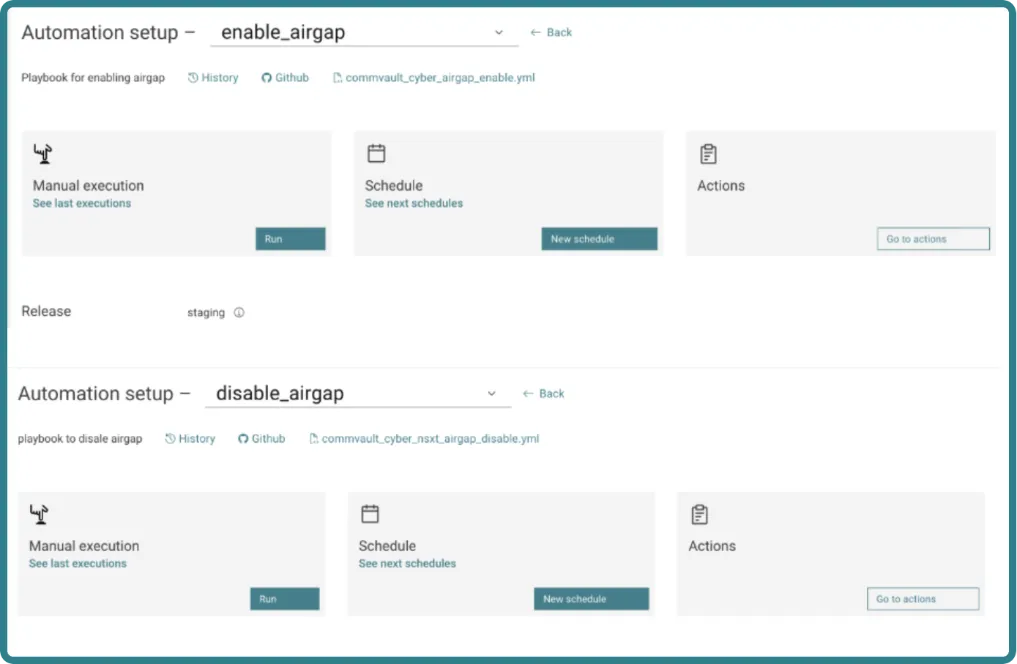
- Configure air-gap automation while creating zones. Create enable_airgap and disable_airgap automations in Automation Service before use.
- Configure vCenter, Commvault and NSX-T credentials in AWX.
Setting up the solution
Create zones and profiles
Create the required recovery zones: User needs to create different zones which are be used for recovery use cases. For example, if we want to recover into the Vault site, then must create vault as a zone.
After the Zone is created, create a profile. The profile captures the detailed configuration of the recovery environment.
You can define any additional attributes needed for the recovery. This will provide flexibility to user to define the recovery settings as per the customer’s unique environment.Create the appropriate profile for each workflow. Attach the profile to the target zone and provide the recovery parameters. For Instant Mount, provide the pre-created Commvault provisioning target.
Configure Airgap automation
Create enable_airgap and disable_airgap automations in Automation Service. Provide the key-value inputs required by the selected network implementation. The source provides the following keys for the out-of-box NSX-T playbook:
Key | Purpose / example from source |
|---|---|
nsxt_dfw_layer3_disable_rule_for_airgap_enable | Boolean values controlling firewall rule handling. |
nsxt_dfw_layer3_policy | NSX-T layer 3 policy name(s). |
nsxt_dfw_layer3_rule | NSX-T rule name(s). |
nsxt_dfw_layer3_rule_action | Rule action values, such as ALLOW. |
nsxt_domain_name | NSX-T domain name(s). |
nsxt_ip | NSX-T manager IP address. |
res_airgap_target_host | Host on which the air-gap playbook runs to control jump host and related firewall rules. |
Create AWX credentials
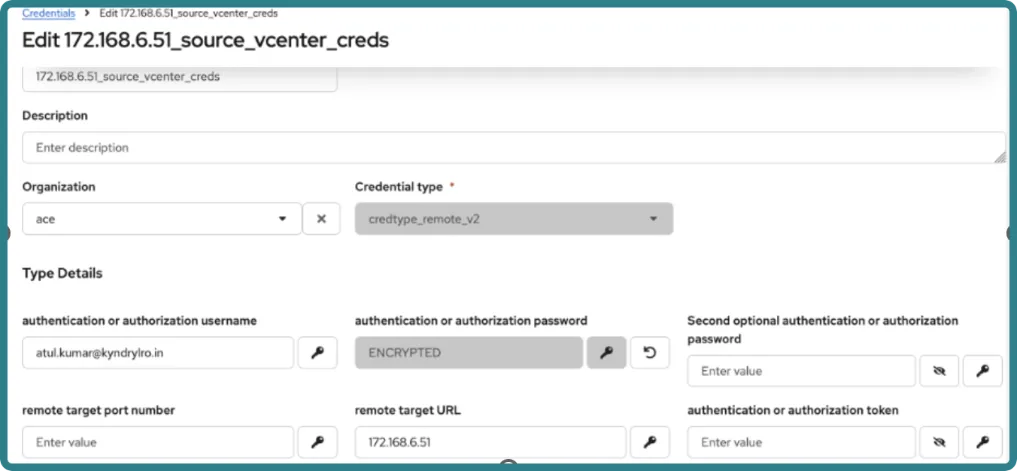
Create vCenter credentials for discovery, Clean Room, Isolated Recovery and Instant Mount profiles.
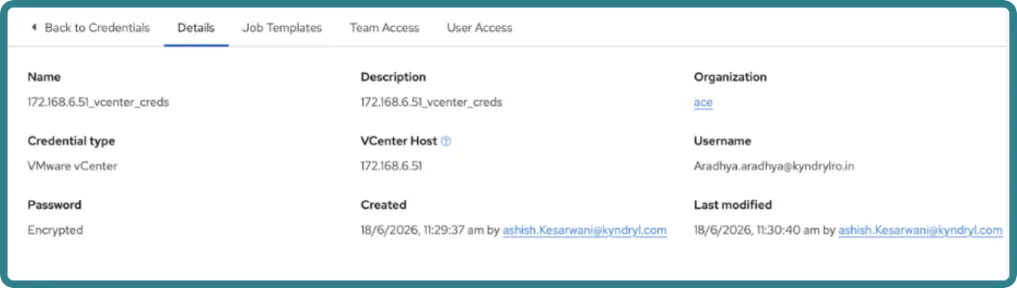
Create separate source and destination vCenter credentials for Migrate-To-Production.
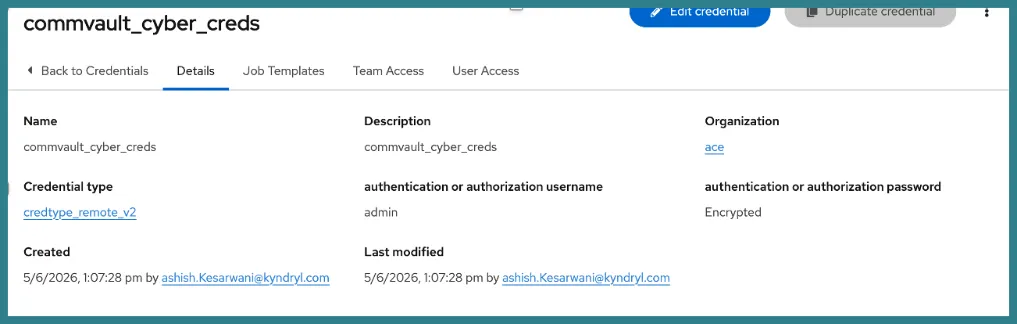
- Enter vCenter user Name authentication or authorization username.
- Enter vCenter Password authentication of authorization password.
- Enter vCenter IP as remote target URL.
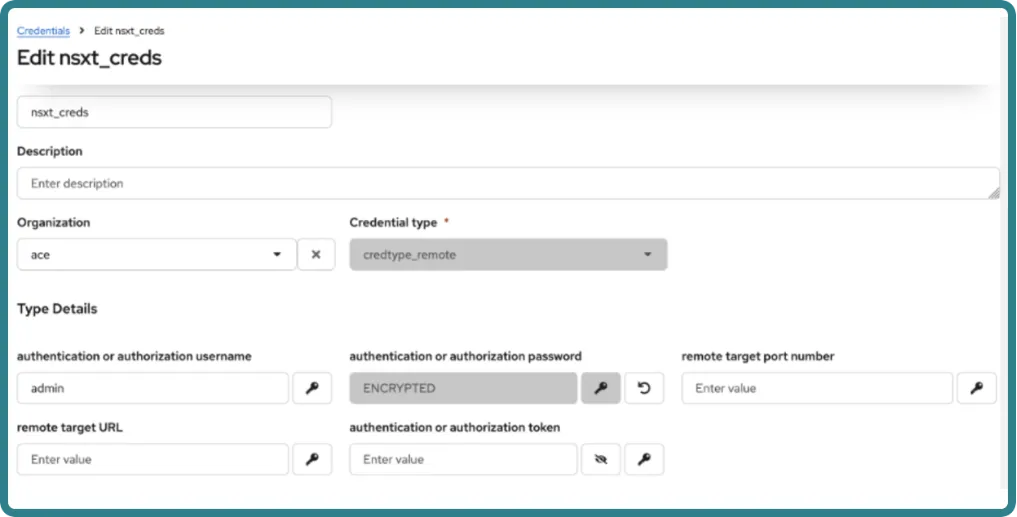
Create NSX-T credentials for enable_airgap and disable_airgap automation.
Inputs for onboarding
Basic and insights
Variable | Description | Required | Credential-backed |
|---|---|---|---|
Primary_commserv_ip |
| Yes | No |
Primary_vcenter_ip |
| Yes | Yes |
Resiliency_host |
| Yes | Yes |
Resiliency_target_host |
|
|
|
Project creation
From the Kyndryl Bridge main menu  , go to Services --> Kyndryl Services --> Intelligent Recovery Services. From the local navigation, select Setup & Configuration.
For more information, go to Setup & ConfigurationSetup & Configuration.
Automation inputs are supplied through the selected recovery profile and workload configuration. Labels can vary by blueprint. Use the following checklist to confirm that the required values are available before validation.
Input category | Required information | Used by |
|---|---|---|
Recovery point | Snapshot or recovery-point identifier | Restore and Instant Mount |
Destination vCenter | Target vCenter credential and endpoint | Restore, Instant Mount and migration |
Target compute | ESXi host or cluster and resource pool | Restore and migration |
Target storage | Datastore and capacity | Restore, Instant Mount and migration |
Target network | Required port groups and network mappings | Restore and migration |
Live-mount target | Commvault provisioning target and policy | Instant Mount and cleanup |
Production destination | Production vCenter, ESXi, datastore and port groups | Migrate to production |
Air-gap configuration | Enable/disable automation and required key-value pairs | Air-gap workflow |
Do not enter passwords as plain text parameters. Select the corresponding credentials configured in AWX or Automation Service.
A Intelligent Recovery Service project is used to organize discovery and configuration activities for one or more workloads associated with a solution blueprint.
- Navigate to Setup & Configuration --> Project and select Create New.
- Enter the project name, start date and end date, and then select Create.
- From the project Actions menu, select Configure.
- Select the Cyber Recovery on VMware leveraging Commvault blueprint that is configured for the tenant.
- Review the automatically populated dates, update them if required, and select Save.
Recommended check: If Intelligent Recovery Service shows that a newer blueprint version is available, upgrade the project before upgrading or configuring associated workloads.
Discovery
Discover cyber-protected VMs from the production of Commvault environment and fetch primary VM attributes through the production of VMware environment. The discovery flow integrates with Kyndryl Bridge AIOps Inventory Service and retrieves cyber plans, VM information and cyber-copy metadata for recovery planning.
- Navigate to Setup & Configuration --> Discover or select the project name.
- Open the configured data collection method and select Add Host.
- Provide the production CommServe, production vCenter and jumphost or resiliency-host inputs defined by the blueprint.
- Save the configuration and select the Play action to start data collection.
- Confirm that the data-collection status is Successful before continuing to Resource.
Resource
Use the Resource page to select discovered cyber-protected VMs and create KIRS workloads for monitoring and recovery automation.
- Navigate to Setup & Configuration > Resource.
- Select the project and the associated Commvault cyber recovery solution.
- Review the resources returned by discovery and confirm the expected VM and cyber-copy information is present.
- Select one or more resources and select Create Workload.
- Enter a meaningful workload name and save the workload.
- Select Configure to continue onboarding.
A resource must be converted into a workload before insights, or recovery automations can be configured for it.
Onboarding
The Onboard page is used to add the solution-specific configuration required for monitoring and automation, validate the configuration, and deploy the workload into a managed state.
- Navigate to Setup & Configuration > Onboard and select the project and blueprint.
- Locate the workload and select Add Insights & Automations.
- Configure the Basic, Insights and Automation values required by the selected Commvault cyber recovery profile.
- Use credential references for Commvault, vCenter and, when applicable, NSX-T. Do not store secrets in plain text.
- Select Validate and resolve every validation failure before continuing.
- Select Manage to deploy the workload.
- Confirm that the workload status changes to Managed.
Post-onboarding checks
- Confirm that the workload appears on the Workloads page.
- Confirm that insights and alerts are visible for the configured workload.
- Run the applicable pre-check before a drill or recovery workflow.
- For group recovery, assign managed workloads to a group and associate the group with the required recovery profile.
Supported alerts, conditions and descriptions
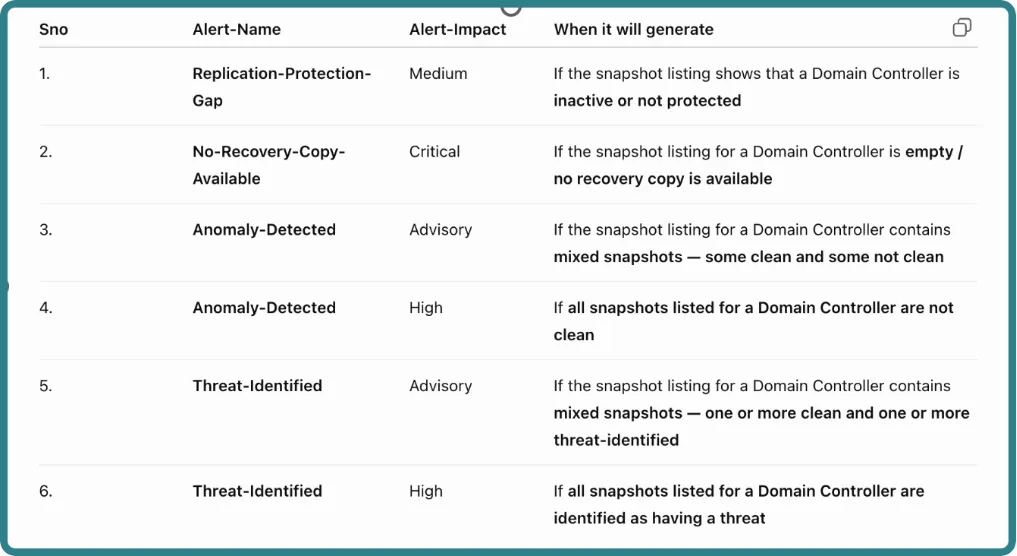
The alert evaluation is performed against the snapshot listing of each Domain Controller individually. The alert status is determined based on the availability, protection status, cleanliness, and threat status of the snapshots associated with that Domain Controller. Below are Alerts supported:
Troubleshooting
Symptom | Recommended check |
|---|---|
Symptom | Recommended check |
SFS upload fails during data collection | Verify SFS_UPLOAD_URL, the configured folder value and upload permissions. |
Data collection succeeds but resources are not shown | Confirm that the extension service is running and check the data-streaming path. |
Pre-check fails | Open the automation artefacts and identify which validation failed, such as snapshot, datastore, ESXi, port group or resource-pool validation. |
Group post-check fails | Review the execution of artefacts for disk, MAC addressor port-group mismatches. |
The target host is unreachable through SSH | Check jumphost reachability and the number of parallel SSH connections allowed by the target sshd configuration. |
Restore, Instant Mount or migration fails | Record the KIRS job ID, review the automation artefacts, and inspect the corresponding job in Commvault Command Center or vCenter. |
VM power-state post-check fails | Confirm that aiohttp is installed and accessible to the jumphost automation user. If privilege escalation is used, confirm pbrun configuration. |
Air-gap automation fails | Validate NSX-T credentials, configured automation names, res_airgap_target_host and zone key-value pairs. |
Escalation information
If the issue remains unresolved, raise an incident in GLPI and include:
- Project
- Workload
- Blueprint
- Workflow or automation name
- IRS job ID
- Commvault or vCenter job ID
- Timestamp
- Error code
- Execution artefacts
- Business impact.
Intelligent Recovery Service incidents follow the support path from S&R Level 1 to Level 2, GTA and then the CTO queue when engineering support is required.
Error codes and recommendations
Code | Group | Operation | Recommendation |
|---|---|---|---|
400 | Misconfiguration | Credential configuration for migration to production | Validate the configured migration credentials and required fields. |
401 | Service issue | Authentication across automation tasks | Validate credentials and authentication of reachability. |
402 | Service issue | vCenter authentication | Validate vCenter credential values and account access. |
403 | Service issue | Forbidden response | Confirm that the account has the required privileges. |
501 | Service issue | API endpoint | Validate endpoint configuration and service availability. |
9700 | Service issue | Token generation | Validate Commvault credentials and connectivity. |
9717 | Connection issue | Job monitoring | Validate connectivity to the job monitoring service. |
9756 | Component playbook | Job monitoring | Review automation of job output and component logs. |
9795 | Process incomplete | Restore job lookup | Verify job status and retry-state information. |
9796 | Process incomplete | Restore job parsing | Review restores job response and automation logs. |
9801 | Misconfiguration | vCenter instance ID | Validate the vCenter instance identifier. |
9802 | Misconfiguration | Recovery target | Validate the configured recovery target. |
9804 | Misconfiguration | Policy details | Validate policy and cyber-copy configuration. |
9805 | Service issue | Datacentre fetch | Validate vCenter service connectivity. |
9806 | Misconfiguration | Cluster not found | Check the configured cluster name and inventory. |
9824 | Service issue | Cyber plans | Validate Commvault plan API availability. |
9825 | Service issue | Cyber VMs | Validate Commvault VM discovery API availability. |
9826 | Configuration issue | Discovery authentication | Validate discovery credentials. |
9827 | Service issue | Discovery API | Validate API endpoints and service health. |
9828 | Service issue | Datastore size | Validate datastore API access. |
9829 | Misconfiguration | Datastore not found | Check datastore selection and inventory. |
9830 | Prerequisite | Insufficient capacity | Provide sufficient datastore capacity before retrying. |
9831 | Component playbook | Capacity calculation | Review capacity inputs and component logs. |
9832 | Service issue | VM details | Validate VM inventory access. |
9850 | Service issue | Cluster information | Validate cluster API access. |
9851 | Misconfiguration | ESXi not in cluster | Select an ESXi host in the expected cluster. |
9859 | Component playbook | Cluster fetch | Review cluster lookup output. |
9861 | Misconfiguration | Port-group validation | Confirm that required port groups exist. |
9862 | Service issue | Port-group API | Validate vCenter API connectivity. |
9863 | Service issue | VM ID fetch | Validate VM inventory access. |
9864 | Misconfiguration | VM ID not found | Confirm VM name and inventory. |
9865 | Service issue | Power-on API | Validate VM power-operation access. |
9866 | Misconfiguration | Power-on state | Review VM state and workflow prerequisites. |
9867 | Misconfiguration | Set port group | Validate network mapping and permissions. |
9868 | Misconfiguration | Port-group count | Verify the expected network adapter and port-group mapping. |
9869 | Service issue | Datacentre API | Validate datacentre API connectivity. |
9870 | Misconfiguration | Datacentre not found | Check the configured datacentre. |
9871 | Misconfiguration | Datacentre name empty | Provide the datacentre name. |
9872 | Component playbook | Datacentre fetch | Review datacentre lookup output. |
9876 | Service issue | vCenter token | Validate vCenter credentials and token service. |
9879 | Service issue | VM network details | Validate VM network inventory access. |
9880 | Service issue | Reconfigure API | Validate reconfiguration privileges and API health. |
9881 | Misconfiguration | Port group not on ESXi | Select a port group available on the target ESXi host. |
9882 | Component playbook | Reconfigure operation | Review reconfiguration task logs. |
9883 | Service issue | Power off | Validate power-operation access and VM state. |
9884 | Process incomplete | Delete VM | Review VM deletion state and permissions. |
9889 | Component playbook | DR ESXi fetch | Review DR ESXi discovery output. |
9891 | Process incomplete | Delete live mount | Review Commvault and vCenter cleanup status. |
9893 | Misconfiguration | Recovery target IDs | Validate target identifiers. |
9894 | Prerequisite | Live-mount policy | Configure a valid live-mount policy. |
9895 | Component playbook | VM name computation | Review naming inputs. |
9896 | Component playbook | Live-mount check | Review active mount lookup output. |
9897 | Component playbook | Live-mount job check | Review live-mount job output. |