Cluster Config Assistant
The Cluster Config Assistant helps site reliability engineers (SREs) and operations teams identify underutilized clusters and optimize resource consumption. The feature uses a data science (DS) model to analyze cluster utilization data and generate recommendations for downsizing cluster configurations when appropriate.
Access Downscaling Cluster
Use the Downscaling Clusters page to identify clusters that may be overprovisioned and review optimization recommendations generated by the Cluster Config Assistant data science model. The recommendations are based on historical cluster utilization data and help operations teams evaluate opportunities to reduce resource consumption while maintaining application performance.
Reviewing these insights enables informed decisions about cluster sizing by comparing current and recommended node configurations and analyzing utilization trends over time.
Follow these steps to access Downscaling Cluster:
- From the Kyndryl Bridge main menu, go to Services → Platform Services → Cloud Management → Container Cluster Management
- From the left side menu, select Actionable Insights.
- Open Downscaling Clusters to open the Downscaling page and view clusters with optimization recommendations.
Downscaling Clusters page
The Downscaling Clusters page helps operations teams identify clusters that may be overprovisioned and review optimization opportunities generated by the Config Assistant Model. The recommendations are based on historical cluster utilization data collected and analyzed by the data science model, helping users determine whether a cluster can be downsized while maintaining stability and performance. Information in this view is intended to support operational decision-making by providing recommended node configurations, utilization insights and historical usage trends.
Page Components
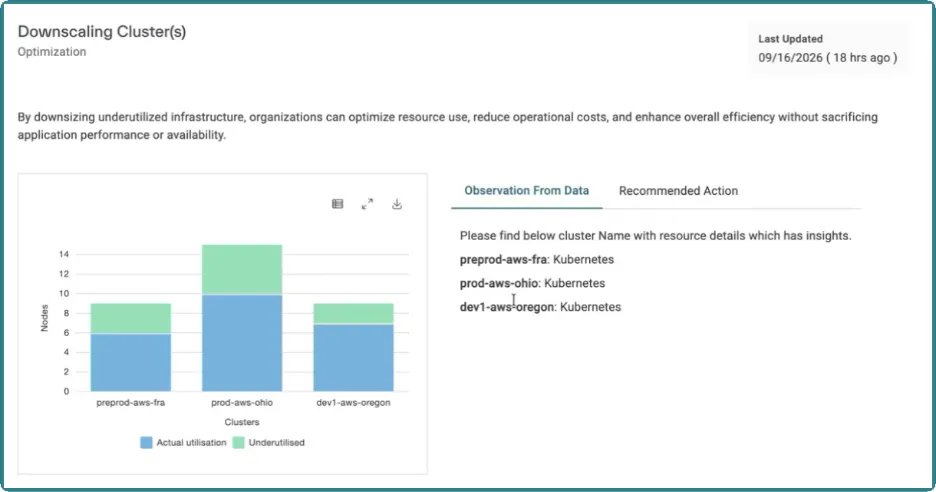
Last Updated
Displays the date and time when the recommendations were last generated, allowing users to verify the freshness of the analysis.
Utilization Overview Chart
This view helps users quickly identify clusters that may have excess capacity and could benefit from downsizing. The model evaluates cluster utilization and recommends reducing node counts when workloads consistently require fewer resources.
The chart provides a visual comparison of:
- Actual Utilization (actively used nodes).
- Underutilized Capacity (nodes identified as candidates for optimization) .
For each cluster, the page identifies resources that have been analyzed and determined to have potential optimization opportunities. The feature identifies clusters with underutilized resources and presents them for review.
Recommended Action
Provides guidance for addressing identified optimization opportunities.
The recommended actions include:
- Validate the recommended node count against workload requirements.
- Remove surplus nodes in a controlled manner.
- Monitor cluster utilization after implementing changes.
These recommendations are intended to help users safely reduce infrastructure costs while maintaining application availability.
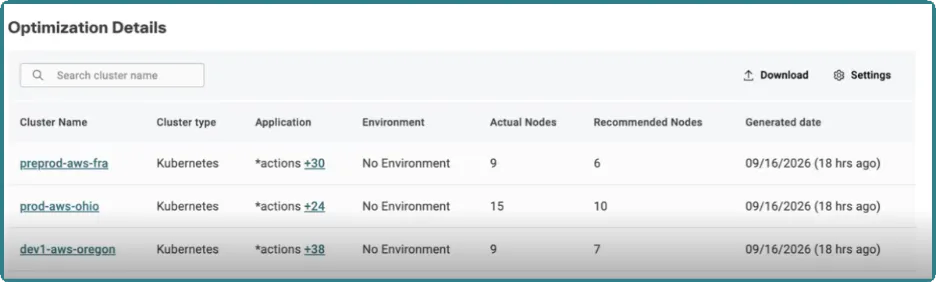
Optimization Details Table
The Optimization Details table provides detailed information for each cluster recommendation, including:
- Cluster Name: Name of the cluster with an optimization opportunity.
- Cluster Type: The cluster platform (for example, Kubernetes).
- Applications: Applications running on the cluster.
- Environment: Associated environment information.
- Actual Nodes: Current number of cluster nodes.
- Recommended Nodes: Suggested node count calculated by the Config Assistant Model.
- Generated Date: Date when the recommendation was created.
To view detailed recommendation information for a cluster, click the cluster name in the Optimization Details table.
This opens the recommendation details page, where you can review the suggested node configuration, utilization insights and historical trend data used by the Config Assistant Model to generate the recommendation.
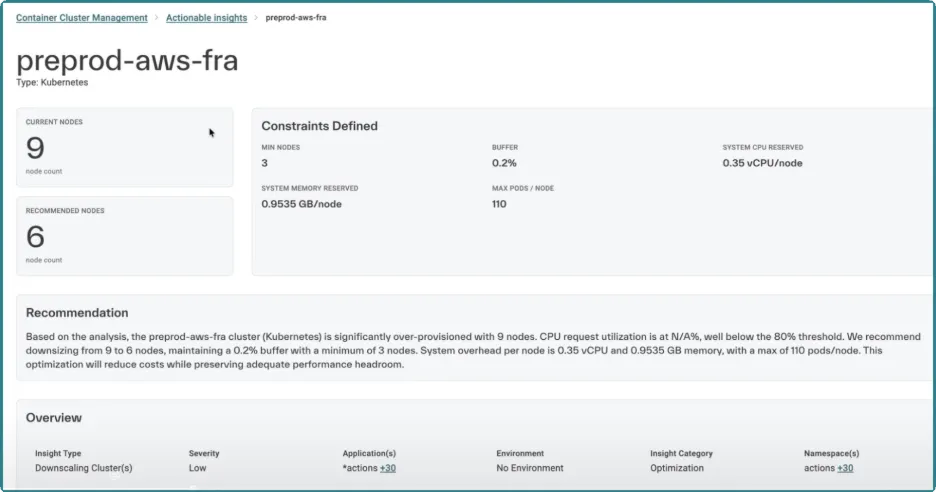
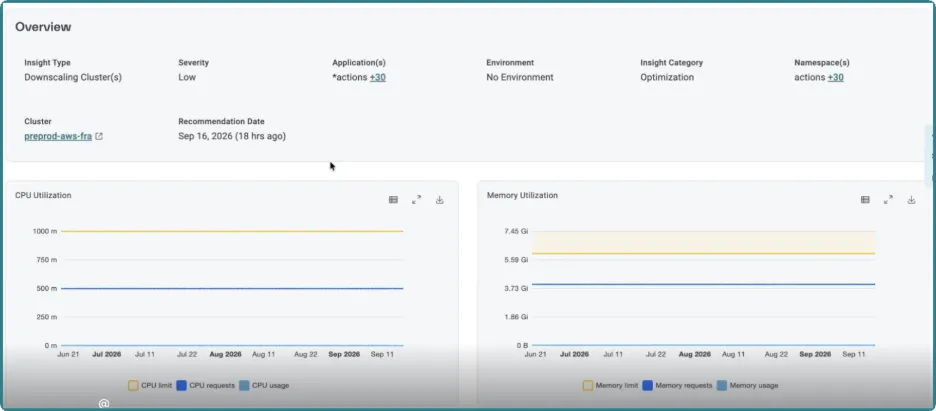
Cluster with higher node counts received recommendations to reduce the number of nodes based on observed utilization data. Users can select a cluster to view more detailed recommendation information and historical utilization trends.
How Recommendations Are Generated
The Config Assistant Model analyzes historical cluster utilization data to identify underutilized resources and generate cluster downsizing recommendations. These recommendations are intended to help operations teams make informed decisions about resource optimization while maintaining application performance and availability.
Consider the following when reviewing recommendations:
- Recommendations are generated after a minimum of 7 days of utilization data is available and are based on all historical data collected, not just the initial 7-day period. As additional data is gathered, the model continues to refine its recommendations using the complete available utilization history.
- The model continues to aggregate additional utilization data over time, up to 90 days.
- Additional historical data generally improves the accuracy and reliability of recommendations.
- Historical utilization trends are available to help assess whether resource consumption patterns are consistent over time.
- Recommendations are advisory and should be evaluated alongside workload requirements, operational constraints, and potential usage seasonality before implementing cluster sizing changes.