Application files recovery using IBM SVC
Overview
The Kyndryl Bridge AIOps-based Resiliency platform enables business continuity and cyber resiliency for multiple IT applications and databases; all managed through a single platform-as-a-service.
The platform also automates key tasks and configurations to enhance efficiency, scalability, and reliability. This guide focuses on integrating an application file recovery using the IBM Spectrum Virtualize (SVC) solution into the Kyndryl Bridge AIOps Resiliency Platform.
Objective
This solution aims to automate IBM SVC-based application recovery tasks and configurations, streamline recovery operations, and enhance both efficiency and reliability.
Architecture and network flow
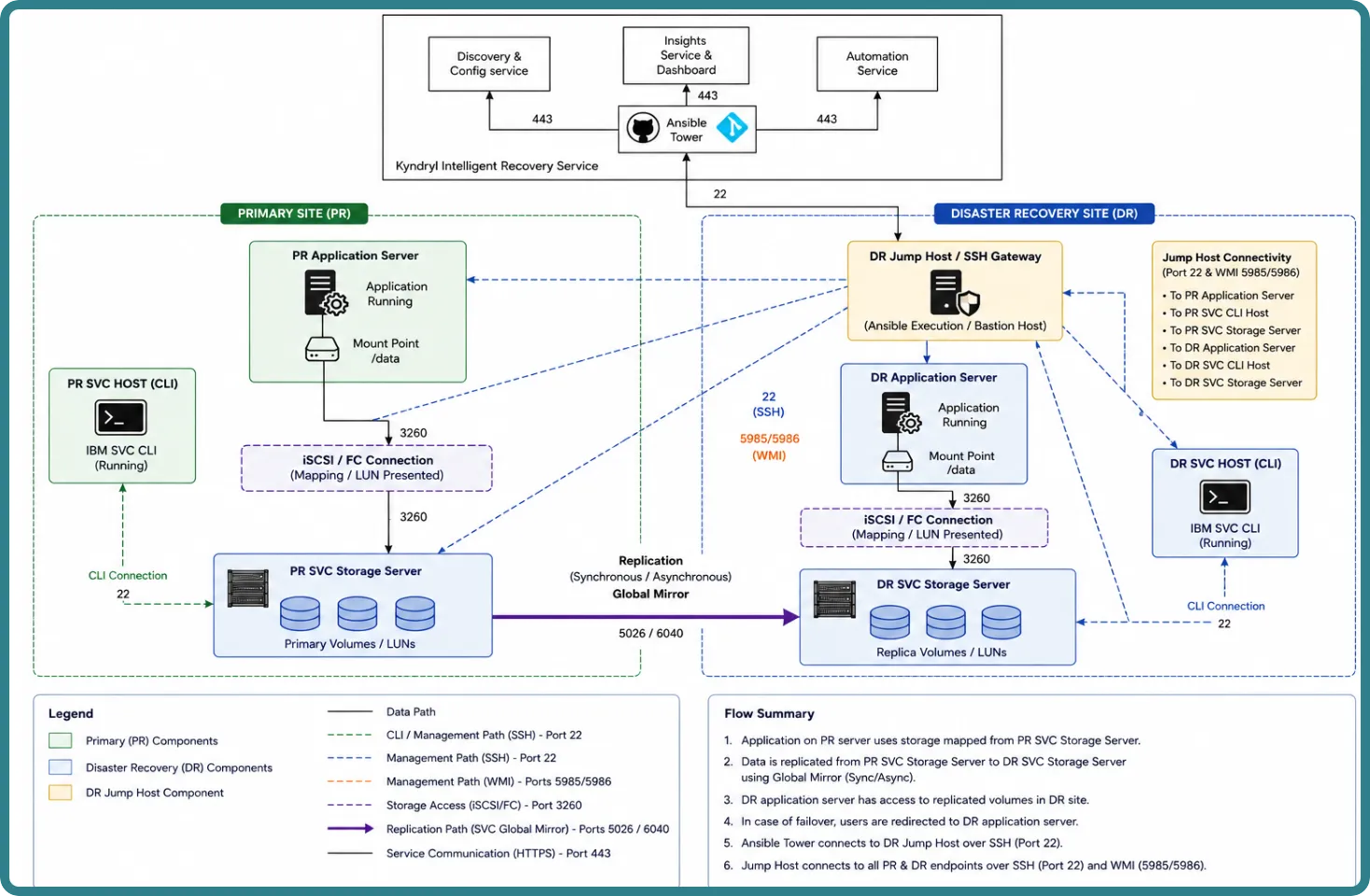
In this Disaster Recovery (DR) solution, the production site hosts the application on a Linux server. The application's data resides on a volume mounted (for example, /data) on the application server. Replication from the PR site to the DR environment is performed using IBM SVC Global Mirror (Synchronous or Asynchronous), with volumes organized into individual Remote Copy (RC) relationships or Consistency Groups (CGs).
The IBM SVC replication continuously copies data from the PR SVC Storage Server to the DR SVC Storage Server over designated replication ports (5026 / 6040). This replication is monitored at configured intervals via the IBM SVC CLI over SSH (Port 22) and reported to the Insights Service & Dashboard via HTTPS (Port 443).
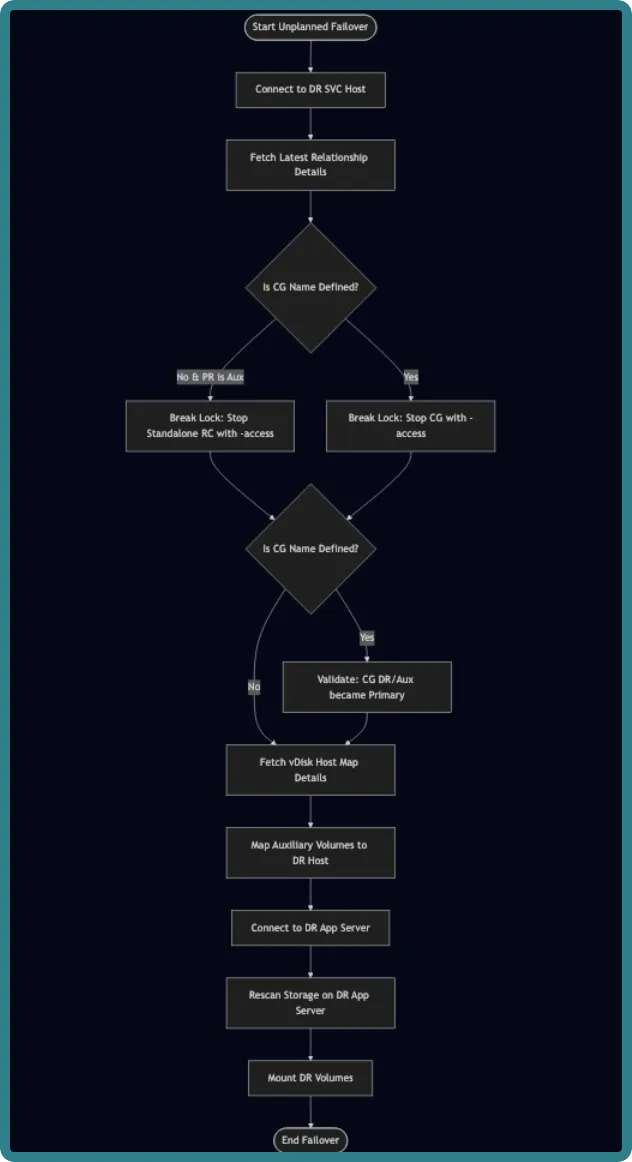
The solution enables seamless application failover from the PR to the DR site. It performs the following steps via the Ansible Tower automation:
- Stops the application at the production site.
- Unmounts the volumes from the PR application server.
- Performs a switchover/failover of the IBM SVC volumes to the DR site (promoting the auxiliary volumes to primary).
- Maps the replicated volumes to the DR application server via iSCSI/FC connections (Port 3260).
- Mounts the required volumes at the DR site.
- Restarts the application at the DR site.
Risk, Assumptions, Constraints, and Dependencies (RACD)
The operational expectations and design boundaries for integrating the Intelligent Recovery Service with applications protected using IBM SVC are listed below. It provides clear requirements for successful implementation, orchestration, and ongoing steady-state operations.
Risks
- Missing or insufficient SSH privileges, or expired credentials for the IBM SVC CLI, may block discovery or replication orchestration operations.
- IBM SVC Consistency Groups or relationships drifting from expected states (for example, disconnected, copying) may cause switchover orchestration failures or create data integrity risks.
- Failing to quiesce or correctly shut down the application prior to replication cutover may result in data inconsistency at the DR site.
- Differences in mount points, filesystem names, or SCSI IDs/LUNs between PR and DR may cause automation mapping steps to fail.
- Loss of network connectivity over replication ports (5026 / 6040) during an active sync may leave volume pairs in transitional or undefined states.
- Changes in sudo privileges or OS policies may prevent storage rescan or application mount commands from running under automation accounts.
Assumptions
- IBM SVC Global Mirror replication between PR and DR storage servers is configured, healthy, and in a synchronized state.
- RC relationships and Consistency Groups are defined and properly mapped.
- Ansible Automation Tower / AAP can connect to the designated DR Jump Host via SSH (Port 22). The DR Jump Host provides controlled SSH connectivity to the PR and DR SVC CLI hosts and the PR and DR Application Servers.
- Application stop/start procedures or service scripts are available, version-controlled, and validated at both PR and DR sites.
- The Jump Host / Ansible Execution Environment has sudo access to the required OS-level users (for example,
,application owners) on the application servers.
- Host-level constructs, volume groups, logical volumes, filesystems, and mount points (for example,
,/data), are consistent or properly mapped between PR and DR environments.
- DNS and NTP configurations are uniform across PR, DR, and automation hosts to prevent naming or time-sync inconsistencies.
Constraints
- Supported replication modes are limited to those natively supported by the IBM SVC architecture (for example, Metro Mirror, Global Mirror).
- Host-based replication technologies are not included.
- Only SVC-controlled vDisks/volumes within predefined RC relationships or Consistency Groups are included in orchestrated actions.
- Unmanaged devices are excluded.
- Filesystem automation assumes POSIX-compliant implementations (for example, ext4, xfs).
- Clustered or shared filesystems require additional validation.
- All directional operations (switchover, failover, switchback) depend heavily on the current replication state (for example, consistent_synchronized).
- Mismatched or inconsistent states must be remediated manually or handled by specific disaster-override flags (for example, -access) before automation proceeds.
- Storage zoning, masking, and base host registration changes are outside the automation scope and must be pre-provisioned on the SVC clusters.
Dependencies
- IBM SVC CLI access is enabled and functional on the designated PR and DR SVC hosts.
- Ansible Automation Platform (or equivalent) is available and configured with: I
- BM SVC-specific automation roles/playbooks (for example, switchrcrelationship, stoprcconsistgrp).
- Linux OS operation modules for disk rescanning and mounting.
- Git repository hosting the IBM SVC automation content (roles/playbooks) is reachable at runtime via HTTPS (Port 443).
- Application service accounts and ownership mappings exist on both PR and DR nodes to perform stop/start, verification, and post-recovery operations.
Jump host
Customer environments may not provide direct connectivity from the automation platform to endpoints within the customer premises. In this design, the DR Jump Host acts as the controlled SSH gateway: Ansible Tower / AAP connects to the Jump Host over Port 22, and the Jump host provides SSH connectivity to the PR/DR SVC CLI hosts and PR/DR application servers.
Supported configuration
The following are the supported versions and platforms for the Application files recovery using the IBM SVC solution:
Supported versions of the OS and platforms
- Linux: Latest non-EOL versions (for example, RHEL 8.x/9.x, SLES 15, Ubuntu 22.04/24.04 LTS)
- AIX: 7.3
- Windows: Windows Server 2019, 2022, and newer non-EOL versions
Supported versions of storage (database/file system) & protection scheme (replication)
- Storage OS: IBM Spectrum Virtualize (SVC) software versions 8.x and 9.x
- Replication Type: IBM SVC Global Mirror / Metro Mirror (Remote Copy Relationships and Consistency Groups)
- CLI Protocol: Secure Shell (SSH) access to the IBM SVC cluster IP.
Port requirements
Source | Destination | Port | Protocol | Direction | Purpose / Usage | Required |
|---|---|---|---|---|---|---|
Ansible Tower / AWX | Jump Host | 22 | TCP/SSH | Unidirectional | SSH connection from Ansible Tower to Jump Host for executing Ansible automation | Yes |
Jump Host | PR / DR SVC Storage Clusters | 22 | TCP/SSH | Unidirectional | SSH access for IBM SVC CLI commands, discovery, insights, and storage lifecycle operations (switchover, failover, switchback) | Yes |
Jump Host | PR / DR Application Servers | 22 | TCP/SSH | Unidirectional | SSH access for executing OS-level commands, storage rescans, and managing application states on Linux endpoints | Conditional |
Jump host | PR / DR Application Servers | 5985 / 5986 | TCP/WinRM | Unidirectional | WinRM access for executing OS-level commands and managing application states on Windows endpoints | Conditional |
Server permissions and library requirements
This section defines the operating system permissions, IBM SVC CLI privileges, required libraries, environment variables, and connectivity prerequisites required for IBM SVC-based automation and orchestration on Intelligent Recovery Services (IRS).
Solution level privileges
- The community.general collection must be installed.
- The ansible_role_kirs_linux_operations (and equivalent Windows operation roles, if applicable) must be specified in roles/requirements.yml.
- The bdg-gps-res-kirs-ansible-role-ibm-svc-cli role must also be specified in roles/requirements.yml.
Operating system permissions
The automation user or designated service account must have the following file-level and execution permissions on the automation execution host and the target application servers:
Permission | Path / Component | Access Level | Purpose |
|---|---|---|---|
Execute | /usr/bin/ssh | Execute | Required on the automation host to issue SVC CLI commands over SSH to the storage clusters. |
Read | ~/.ssh/id_rsa (or equivalent private key) | Read | Required to authenticate the automation user against the IBM SVC clusters. |
Execute | /bin/mount, /bin/umount, /usr/bin/rescan-scsi-bus.sh | Execute | Perform filesystem mounts, unmounts, and storage rescans on target Linux application servers. |
Execute | PowerShell (e.g., Mount-DiskImage, Update-HostStorageCache) | Execute | Perform disk rescans and mounts on target Windows application servers. |
Execute | Service/application control scripts | Execute | Perform application start/stop operations. |
Sudo / Admin | Ability to switch to the application owner without a password / Run as Administrator | Sudo / Admin | Execute application lifecycle operations under correct ownership on the target servers. |
Operating system and application access level summary
Role / Account | Required capabilities / Permissions |
|---|---|
OS User / System Admin | Requires sudo (Linux) or Administrator (Windows) privileges on the application servers to execute storage rescans (/bin/mount, /bin/umount, /usr/bin/rescan-scsi-bus.sh), and manage application states. |
Application Owner | Retains full control and ownership over the application's runtime processes, including start, stop, and status validation scripts. |
Automation Service Account | Requires SSH access (/usr/bin/ssh) to the PR/DR application servers with the ability to sudo to the application owner without a password. Read access to ~/.ssh/id_rsa is required for authentication. |
Required privileges (IBM SVC CLI)
Unlike agent-based storage software, IBM SVC commands are executed remotely via SSH directly to the storage cluster. Access rights are divided strictly based on the intrusiveness of the operation:
Operation Category | Required Role | Allowed Commands / Purpose |
|---|---|---|
Discovery, Insights & Pre-checks
(Read-Only) | Monitor or
RestrictedAdmin | For discovering relationships, calculating RPO, monitoring Data Lag, generating alerts, and performing non-intrusive pre-checks.
Commands: lsrcrelationship, lsrcconsistgrp, lsvdiskhostmap, lshost. |
Automation Operations
(Elevated Privileges) | Administrator or
CopyServicesAdmin | For performing intrusive automation operations (Switchover, Switchback, and Failover) and host mapping.
Commands: stoprcrelationship, stoprcconsistgrp (including -access), switchrcrelationship, switchrcconsistgrp, startrcrelationship, startrcconsistgrp, mkvdiskhostmap, rmvdiskhostmap. |
Features & Benefits of the solution
The solution supports the following capabilities:
- Discovery and configuration data model: Resource types, Data collection, Blueprint generation.
- Insights: RPO calculation, Data lag analysis, Replication status evaluation.
- Automation:
- Dry run validation for failover, switchover, and switchback.
- Switchover, Switchback, Failover operations.
- Pre-checks before intrusive operations.
Benefits
The benefits of the solution are listed below:
- Automatically discover relationships and their associated consistency group status.
- Perform DR drills, including switchover and switchback operations.
Known limitations
The current solution supports application recovery only for Linux-based systems. To enable support for Windows systems, the playbooks must be customized with additional actions.
Application requirements
- SSH connectivity is required from the jump host to the target server.
- A two-hop configuration must be in place for the target server using the corresponding custom credentials.
- The specified username and password must have permissions to execute the following operations:
- ps -ef
- Shell scripts to start the application
- Start the specified application
- Stop the specified application
- Mount the file system
- Unmount the file system
Setting up the solution
Check out this page for more information about onboarding the solution.
Custom Credential Type Configuration (Ansible Tower / AWX)
To securely pass authentication details into the automation playbooks, you must first create a Custom Credential Type in your Ansible Automation Platform (Tower/AWX). Once this template is created, users will generate their actual credentials based on this type.
This custom credential consolidates access for both the IBM SVC storage clusters and the target Application servers into a single interface.
- Input Configuration
Paste the following YAML into the Input Configuration field when creating the Credential Type. This defines the form fields the user will see.
YAML
fields:
- id: pr_server_username
type: string
label: PR SVC SERVER USERNAME
- id: pr_server_password
type: string
label: PR SVC SERVER PASSWORD
secret: true
- id: dr_server_username
type: string
label: DR SVC SERVER USERNAME
- id: dr_server_password
type: string
label: DR SVC SERVER PASSWORD
secret: true
- id: pr_app_server_username
type: string
label: PR APPLICATION SERVER USERNAME
- id: pr_app_server_password
type: string
label: PR APPLICATION SERVER PASSWORD
secret: true
- id: dr_app_server_username
type: string
label: DR APPLICATION SERVER USERNAME
- id: dr_app_server_password
type: string
label: DR APPLICATION SERVER PASSWORD
secret: true
required:
- pr_server_username
- pr_server_password
- dr_server_username
- dr_server_password
2. Injector Configuration
Paste the following YAML into the Injector Configuration field. This maps the user's inputs directly into Ansible extra_vars at runtime.
YAML
extra_vars:
pr_server_username: '{{pr_server_username}}'
pr_server_password: '{{pr_server_password}}'
dr_server_username: '{{dr_server_username}}'
dr_server_password: '{{dr_server_password}}'
pr_app_server_username: '{{pr_app_server_username}}'
pr_app_server_password: '{{pr_app_server_password}}'
dr_app_server_username: '{{dr_app_server_username}}'
dr_app_server_password: '{{dr_app_server_password}}'
User instructions for creating the Credential
Once the Custom Credential Type is saved in Tower/AWX, administrators will use it to create their specific credential instances. Provide them with the following guidelines:
- IBM SVC Storage Credentials (Required): The PR SVC SERVER and DR SVC SERVER fields are mandatory. You must enter the SSH credentials for your Primary and Disaster Recovery IBM SVC clusters here. Note: If your PR and DR storage clusters share the same username and password, you must still enter them twice (once in the PR fields, once in the DR fields).
- Application Server Credentials (Optional): The PR APPLICATION SERVER and DR APPLICATION SERVER fields are optional OS-level credentials. If you populate these, the automation will leverage them to log into the Linux/Windows application hosts to perform storage rescans and safely mount or unmount the IBM SVC volumes during a failover or switchover event.
Automation Workflows
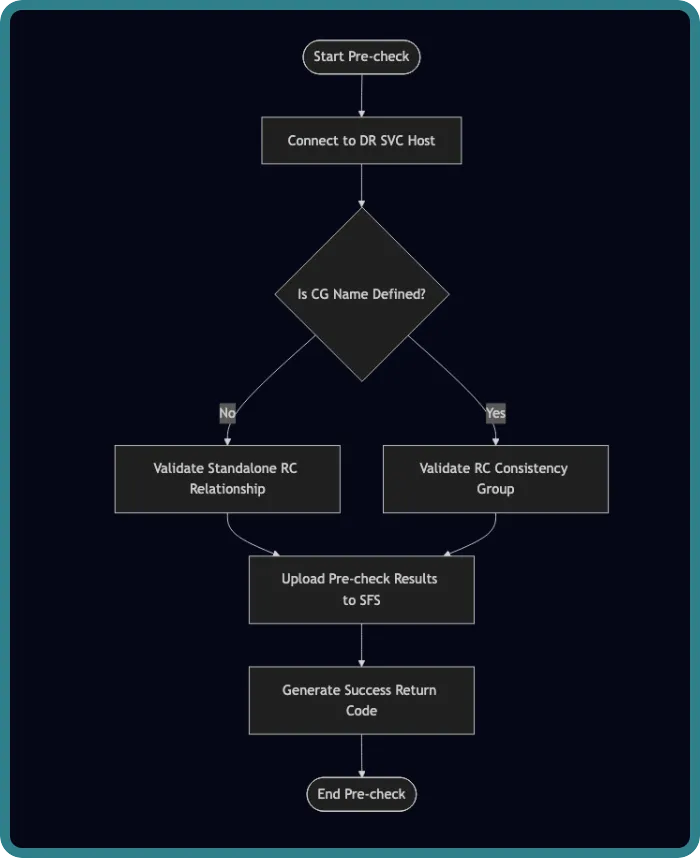
- Switchover / Switchback Pre-check Validation
- Independent Relationship: Validates the health, state, and readiness of the specific standalone Remote Copy relationship ID using the drill precheck task.
- Consistency Group (CG): Validates the overarching Consistency Group and its associated member relationships to ensure they are ready for a drill or switch operation.
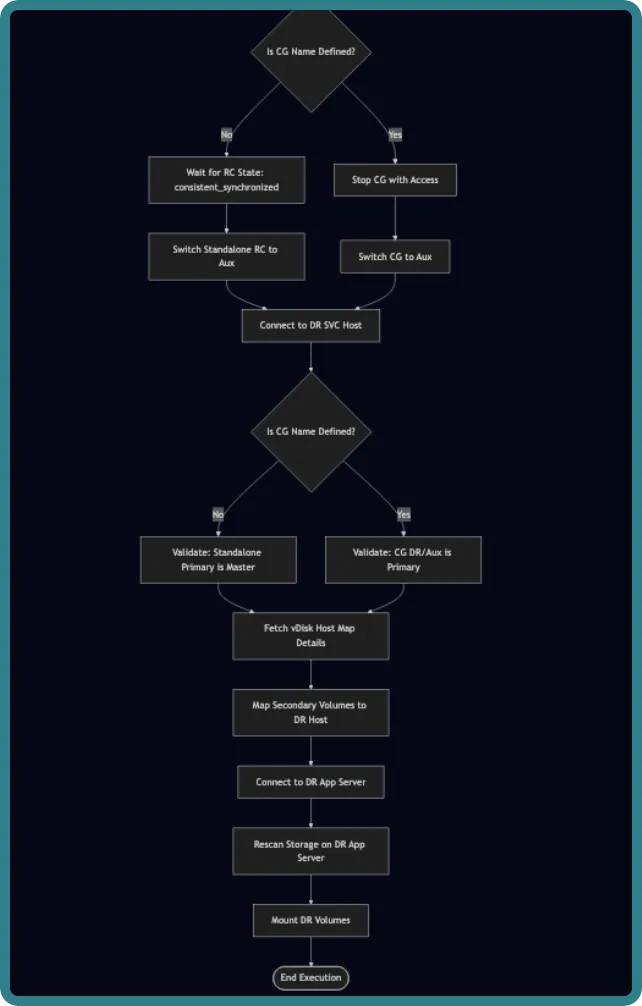
- Switchover / Switchback Execution & Validation
- Independent Relationship:
- Validates that the relationship is in a master state and waits for it to become strictly consistent_synchronized.
- Post-switch, validates that the auxiliary volume (aux) successfully takes over as primary on the DR host.
- Consistency Group (CG):
- Validates that the CG primary state is master before initiating the stop and switch commands.
- Post-switch, validates that the CG role has successfully flipped so that DR/aux becomes the primary group.
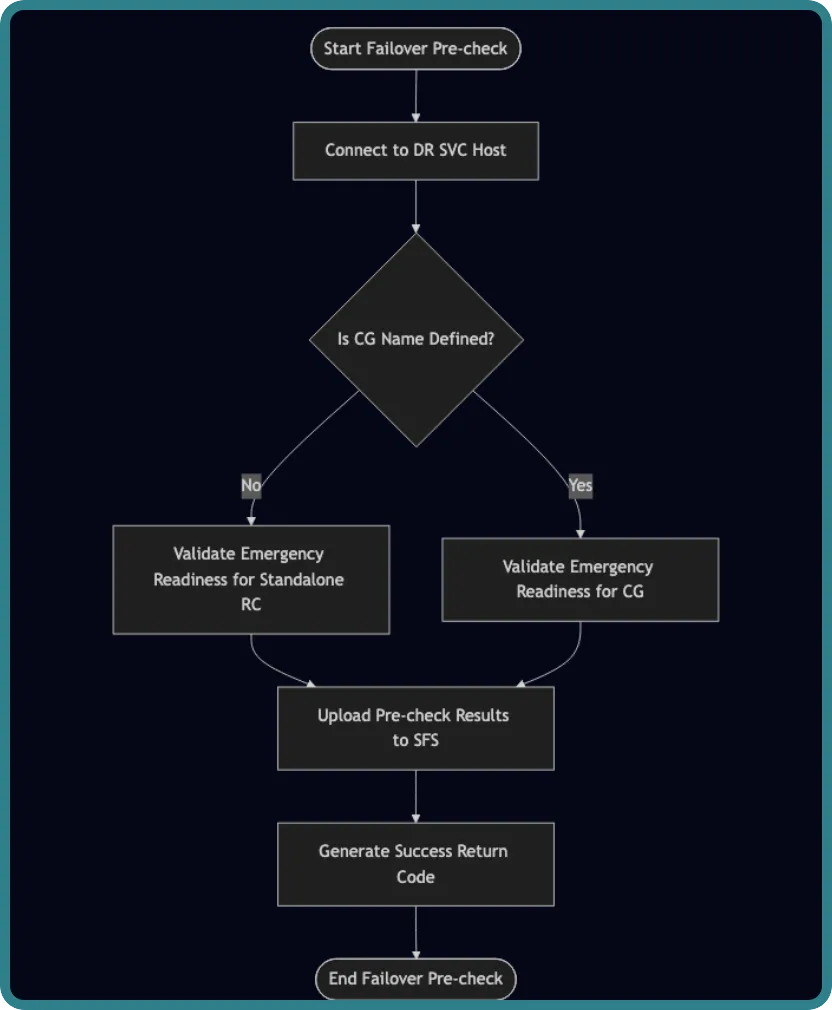
- Failover Pre-check Validation
- Independent Relationship: Performs an emergency pre-check validation specifically targeting the standalone relationship ID for an unplanned failover scenario.
- Consistency Group (CG): Performs an emergency pre-check validation at the group level to ensure safe execution when the primary site is unreachable.
- Failover Execution & Validation
- Independent Relationship:
- Validates that the standalone relationship is in the aux state on the DR side before breaking the lock.
- Validates successful execution of the emergency unlock command (-access) to grant read-write permissions.
- Consistency Group (CG):
- Validates that the CG can be safely unlocked using the access flag.
- Post-unlock, validates that the DR/aux consistency group has successfully assumed the primary role before mapping volumes to the application server.
Troubleshooting
See the following troubleshooting scenarios:
- SFS upload failed for Data collection: Check the SFS upload URL and check permission for upload.
- Data collection success but resources are not listed on Intelligent Recovery Service UI: Check whether the extension service is up and running or not. Also, check if there are any streaming issues.
- Automation execution failed with the error fatal: [Host IP]: UNREACHABLE! => {"changed": false, "msg": "Failed to connect to the host via ssh: Check how many parallel SSH connections are allowed for the host and increase the number of connections in sshd_config.