AIOps Automation Services Fallback workflow
The Artificial Intelligence for IT Operations Automation Services Fallback workflow provides a controlled recovery option for emergency situations when major or critical issues prevent an account from operating fully on Bridge Automation Services after Cutover.
The workflow returns automation execution to Artificial Intelligence for IT Operations Automation Services while maintaining traceability and providing a path to re-enable Kyndryl Bridge after the issues are resolved.
Fallback is not a self-service option. The Automation & Policy team assesses the impact, coordinates with the affected account and guides creation of the fallback catalog item. Once available, an authorized user can execute the fallback from the Orchestration Catalog and select whether event configurations, schedule configurations or both need to be restored.
Use Fallback only for major or critical issues that prevent an account from operating fully on Bridge Automation Services after Cutover.
Access the Orchestration Catalog to execute the Fallback workflow
Use the following path to access the Artificial Intelligence for IT Operations Automation Services Fallback workflow from the Orchestration Catalog:
- From the Kyndryl Bridge main menu
 , go to Catalog → Orchestration Catalog
- The Orchestration Catalog page displays the available catalog items.
- From there, locate the Fallback workflow under Account Operations and proceed with the fallback process.
Fallback workflow capabilities
The Fallback workflow provides the following capabilities to support a controlled and traceable recovery process:
- Restores automation execution to Artificial Intelligence for IT Operations Automation Services after a completed Cutover.
- Requires an impact assessment and guidance from the Automation & Policy team before an authorized user can execute the fallback.
- Restores event configurations, schedule configurations or both by disabling the applicable configurations in Bridge Automation Services and enabling them in Artificial Intelligence for IT Operations Automation Services.
- Restores only convergence-eligible schedules, preserving the account’s prior configuration.
- Logs workflow actions for traceability and supports re-enabling Bridge Automation Services by running the Cutover workflow again after fixes and validation.
Prerequisites
Before running the Fallback workflow, ensure that the following requirements are met:
- Cutover was completed for the affected account.
- A major or critical issue prevents the account from operating fully on Kyndryl Bridge Automation Services.
- The impact assessment has been completed with the Automation & Policy team.
- Fallback has been approved as the appropriate recovery action.
- The fallback catalog item was created for the correct account.
- The event and schedule configurations to be restored have been identified.
- The authorized user has the required permissions to:
- Access and execute the Fallback workflow from the Kyndryl Bridge Automation Services catalog.
- Execute and validate migrated workloads, including public and private content, schedules and event-based executions.
- Validate the workflow outcome.
Roles and responsibilities
Role | Responsibility |
|---|---|
Automation & Policy team | Assesses the impact, confirms that fallback is appropriate, guides creation of the catalog item and coordinates assessment, execution, fixes and testing with the account. |
Authorized user | Reviews the affected configurations, selects the generated catalog item in the Orchestration Catalog, chooses whether to restore events, schedules or both and executes the workflow. |
Account team | Provides issue and impact information, validates the restored operation, completes required fixes and testing and coordinates re-enablement of Kyndryl Bridge . |
Fallback workflow
The Fallback workflow defines the sequence of actions used to return automation execution to Artificial Intelligence for IT Operations Automation Services. The following diagram illustrates the process from Fallback initiation and Cutover-status validation through the restoration of eligible event and schedule configurations and workflow execution tracking.
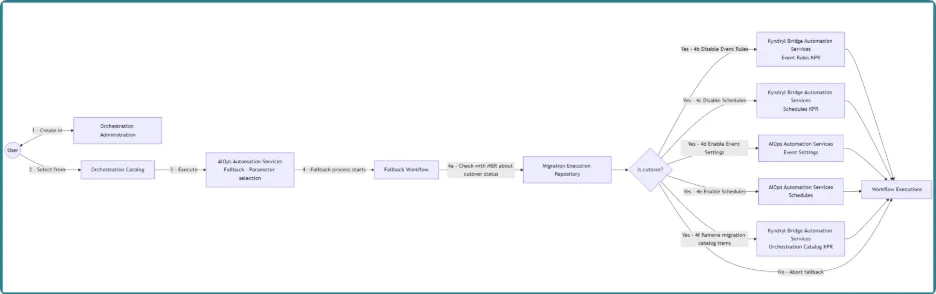
Fallback workflow execution
Artificial Intelligence for IT Operations Automation Services Fallback workflow will perform the opposite actions from the Cutover process. Process consists of creation and execution of the catalog item. For creation, Automation & Policy team will guide the user through the creation process based on the impact assessment.
- On the Orchestration Catalog page, under Account operations, locate and open the fallback catalog item for the affected account.
- Select the connection associated with the completed Cutover.
- Select whether to restore event configurations, schedule configurations or both and set the corresponding options to True. Set configurations that should not be restored to False.
- Review your selections and execute the fallback workflow.
- In Workflow Executions, confirm that the workflow is completed successfully.
- After the cutover completes, the workflow item moves to the Retired state. The migrated schedules and event rules are enabled on the AIOps side.
Once triggered, the Fallback workflow performs the following actions:
- Checks the Cutover status. If the tenant has not completed Cutover, the fallback process stops.
- Disables the applicable Event Rules and Schedules in Bridge Automation Services.
- Enables Event Settings and Schedules in Artificial Intelligence for IT Operations Automation Services. Only convergence-eligible schedules are enabled to preserve the account's previous configuration.
- Returns event and schedule execution to Artificial Intelligence for IT Operations Automation Services.
After the issues are resolved and validated, the account can return to Bridge Automation Services by running the Cutover workflow again.
Fallback considerations
Keep the following considerations in mind when using the Fallback workflow:
- The Fallback workflow is not available by default for all accounts.
- The Automation & Policy team assesses the impact and provides guidance for enabling and executing the workflow.
- The Fallback process, remediation and testing are coordinated with the affected account.