Agentic Solutions Mode
The Agentic Solutions mode demonstrates the next phase of AI Assist — enabling autonomous agents to perform complex, multi-step reasoning and data retrieval tasks.
Each agent starts with a basic set of solutions that can be changed later. Agents follow a specific workflow, which is a sequence of tasks they complete together. The output is in read-only text; no actions or triggers are executed. You can switch configurations between available solutions, like DeepThink or IT Modernization Advisor, if those options are available.
Frameworks and examples
Agentic Solutions is powered by two internal frameworks:
- CrewAI: a simplified, out-of-the-box drag-and-drop type of framework for creating basic agents and workflows.
- LangGraph: a developer-oriented framework supporting advanced, customizable agents with coding and integration capabilities.
Two example solutions are available during the Alpha phase:
- IT Modernization Agentic Advisor: an out-of-the-box demonstration of CrewAI.
- DeepThink: a LangGraph-based custom agentic solution, built by another team and deployed on the Bridge platform for demonstration.
Capabilities
- Demonstrates autonomous, multi-agent reasoning
- Allows users to interact with predefined agents for specific use cases (for example, migration planning or RCA document generation).
Requirements
- Must be part of the ACME account
- Must belong to at least one of the KAIF access groups: KAIF Admin, KAIF Editor, KAIF Viewer.
- The Bridge account must have access to Artificial Intelligence for IT Operations.
- Access permissions to relevant operational datasets are required.
- Users without Artificial Intelligence for IT Operations access must request authorization before using this capability.
Limitations
- Only English language is supported.
- Chat history is not stored.
- Performance may vary when multiple users run queries simultaneously; therefore, requests may queue and respond slowly.
- The feature is meant primarily for demonstration; configuration screens for creating or managing agents are not yet available.
Uploading files to generate an RCA document
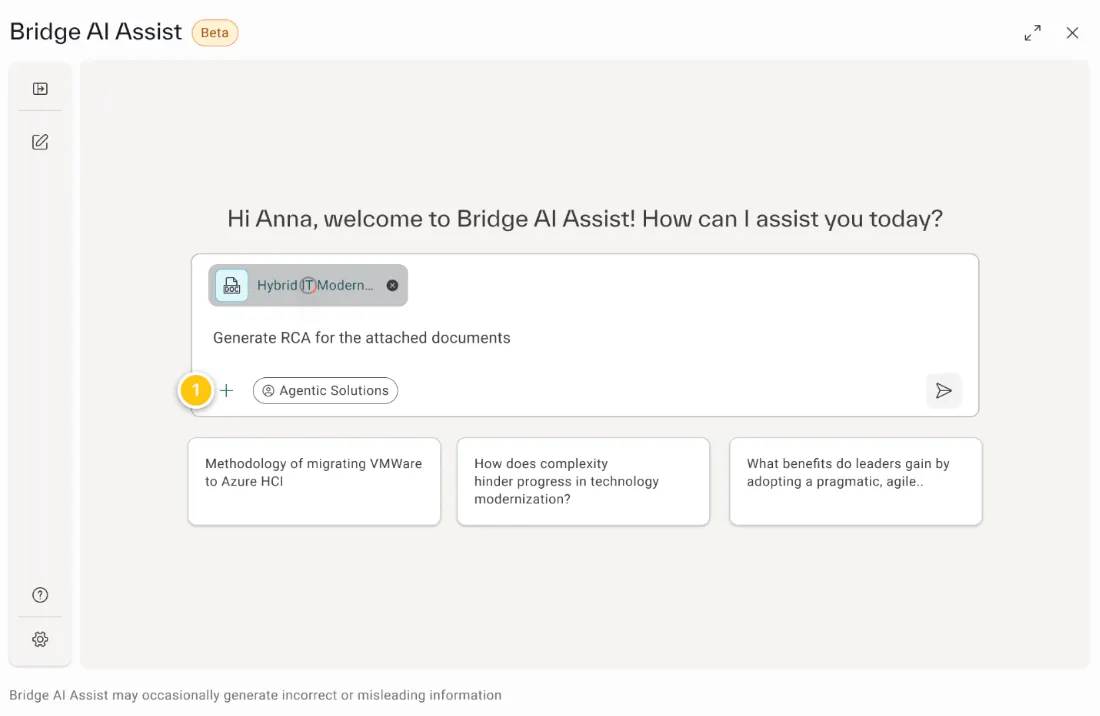
Agentic Solutions mode supports file uploads to generate Root Cause Analysis (RCA) documents after an incident. The system analyzes the content of uploaded files to identify key incident details, contributing factors, and timelines, and compiles them into a structured RCA report.
This automation reduces manual effort, speeds up report creation, and helps maintain consistent incident documentation.
This feature is enabled by default for all Artificial Intelligence for IT Operationsusers.
Generate an RCA document
- Log in to the Bridge AI Assist portal.
- From the right-hand panel, open the RCA Document Generator.
- In the chat text box, select the + (upload) icon.
- Upload one or more incident-related files.
- In the chat, type Generate RCA for the attached document.
- Wait while the system processes the files. This may take a few moments.
- When processing is complete, download the generated RCA document.
File upload limits
- You can upload up to five files per session. Supported formats include PDF, PPT, and Word.
- The maximum total file size is 10 MB per session.
The output is currently generated in PDF format only and is not available in editable formats such as PPT or Word.
Data handling
Uploaded files are used only during the active session to provide context-aware responses. The content is not stored in the knowledge base and is not retained after the session ends.